Security
How Locked protects your files
Locked encrypts every photo, video, file and note on your iPhone or iPad before it is saved. Your pattern or password is stretched with Argon2id (3 passes, 64 MiB) and combined through HKDF-SHA256 with a secret held in the device’s Secure Enclave. Each file and thumbnail then gets its own random 256-bit key and is encrypted with AES-256-GCM. Below is every algorithm, what it protects, and what it does not.
Last reviewed , for Locked 1.0. The app explains the same in Settings → How Locked Protects You.
What does Locked use?
| Unlock secret | A pattern of at least 6 dots on a 5 × 5 grid, or a password of at least 8 characters. No Face ID or Touch ID. |
|---|---|
| Key derivation | Argon2id, 3 passes over 64 MiB of memory |
| Device binding | HKDF-SHA256, salted with a Secure Enclave P-256 secret that never leaves the device |
| File keys | A random 256-bit key for every file and every thumbnail |
| File encryption | AES-256-GCM, in chunks |
| Padding | Padmé, so file sizes give little away |
| On disk | Random file names, no magic bytes or recognisable header |
| Index | Names, tags and text recognised in photos, kept only in the encrypted index |
| Vault table | One fixed-size table of 16 slots; unused slots are random bytes |
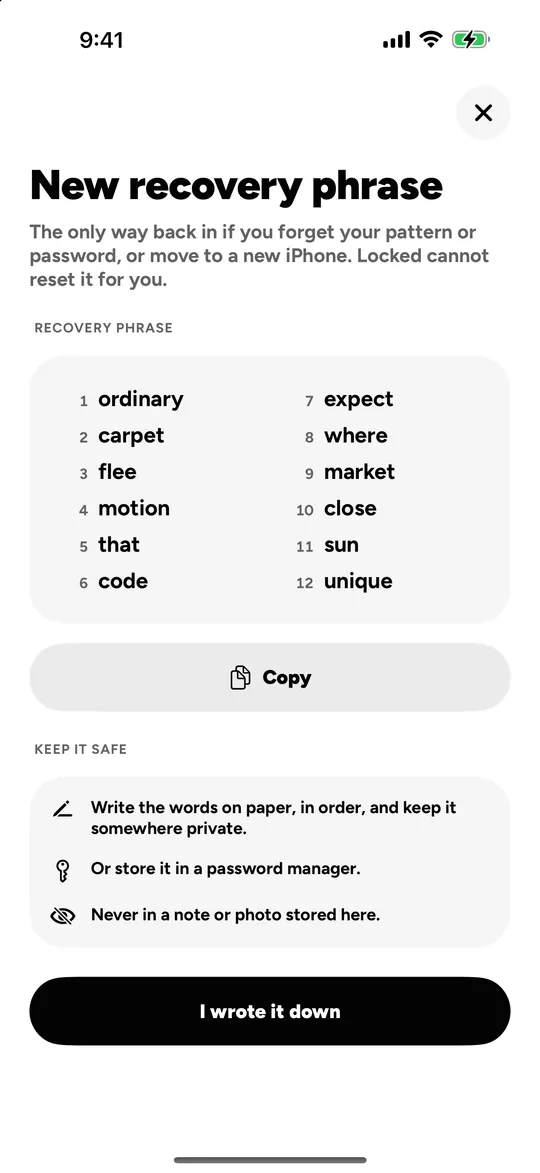
| Recovery | A 12-word phrase per vault, carrying 128 random bits |
| Network | None, except iCloud Sync (Locked Pro) to your own iCloud Drive, and purchase history under a random ID |
How is the key to a vault made?
What is encrypted?
- The contents of every photo, video, file and note.
- Every thumbnail, with a key of its own.
- File names, album names, tags, and the text search finds in your photos (the encrypted index).
- Intruder photos, taken and encrypted on the device.
- What iCloud Sync stores: the same encrypted files, without the keys that open them.
What leaves the device?
- Your files
- Nothing, unless you turn on iCloud Sync (Locked Pro). Then the encrypted files go to your own iCloud Drive.
- Account details
- None exist. There is no account.
- Usage analytics, crash reports, ads, tracking
- None.
- Purchases
- Purchase history, under a random ID, to RevenueCat, so purchases can be restored and counted. Not linked to you.
- Search
- Nothing. Text and scene recognition run on the device.
What can Locked not protect against?
Every vault app has limits. These are Locked’s, as the app itself states them.
-
Someone who can see your screen
While a vault is open, anyone who can see your screen sees what you see. Screenshots and recordings come out blank, but nothing stops another camera filming the screen.
-
A forgotten secret and lost recovery words
Lose both the pattern or password and the 12 words, and the vault is gone. There is no account and no reset, and we cannot recover it.
-
A pattern anyone could guess
People draw the same few shapes. A pattern of 6 or 7 dots is the easiest to guess; 8 dots or more, or a password, is much safer.
-
Counting vaults from inside
A device holds up to 16 vaults, 3 without Locked Pro. Any secret opens a vault, but once the limit is reached the next new vault opens the purchase sheet or says there is no room, so someone who can use the phone could count your vaults by setting up new ones.
-
The free allowance
Without Locked Pro all vaults share 101 photos, 10 videos, 10 files and 10 notes, so a vault that runs out of room early shows that other vaults hold items.
-
Storage and backups
The storage Locked uses shows in the Settings app, and padding cannot hide gigabytes. Two copies of an iCloud backup taken at different times show how many vaults changed in between.
-
Forensic access to an unlocked device
Someone with full forensic access to an unlocked device could read which slots of the vault table are in use.
-
Duress on other devices
A duress vault erases the other vaults on this device and in iCloud. Your other devices keep their copies.
-
The camera indicator
With Intruder Photos on, iOS shows its camera indicator when the photo is taken.
-
A compromised device
Locked cannot protect a device that is already compromised, for example by software that records the screen or the keyboard.
Can you recover my vault?
No, and that is the point. Locked has no account, no server holding your keys and no back door. The only way back into a vault is its pattern or password, or its 12-word recovery phrase. Write the words on paper, in order, or keep them in a password manager; never in a note or photo inside the vault they open.
Found a problem with anything on this page? Write to us. See also every feature and the privacy policy.